קלט ופלט של פרימיטיבים
Package versions
הקוד בעמוד הזה פותח באמצעות הדרישות הבאות. אנחנו ממליצים להשתמש בגרסאות האלה או חדשות יותר.
qiskit[all]~=2.5.2
דף זה מספק סקירה כללית של הקלט והפלט של פרימיטיבי Qiskit SDK. עם פרימיטיבים אלה תוכל להשתמש במבנה נתונים המכונה Primitive Unified Bloc (PUB) כדי להגדיר ביעילות עומסי עבודה מווקטרים. PUBs אלה הם יחידת העבודה הבסיסית להרצת עומסי עבודה. הם משמשים כקלטים לשיטת run() עבור פרימיטיבי Sampler ו-Estimator, שמריצים את עומס העבודה המוגדר כמשימה. לאחר השלמת המשימה, התוצאות מוחזרות בפורמט שתלוי ב-PUBs שנעשה בהם שימוש ובכל אפשרויות שצוינו.
סקירה כללית של PUBs
בעת קריאה לשיטת run() של פרימיטיב, הארגומנט העיקרי הנדרש הוא list של tuple אחת או יותר — אחת לכל Circuit המורץ על ידי הפרימיטיב. כל אחת מ-tuples אלה נחשבת ל-PUB, והאלמנטים הנדרשים של כל tuple ברשימה תלויים בפרימיטיב המשמש. הנתונים המסופקים ל-tuples אלה יכולים גם להיות מסודרים במגוון צורות כדי לספק גמישות בעומס עבודה באמצעות broadcasting — כללים שמתוארים בסעיף הבא.
Estimator PUB
עבור פרימיטיב ה-Estimator, פורמט ה-PUB צריך להכיל לכל היותר ארבעה ערכים:
QuantumCircuitיחיד, שעשוי להכיל אובייקטParameterאחד או יותר- רשימה של observable אחד או יותר, המציינים את ערכי הציפייה להערכה, מסודרים במערך (למשל, observable יחיד המיוצג כמערך ממימד 0, רשימת observables כמערך חד-ממדי, וכן הלאה). הנתונים יכולים להיות בכל אחד מפורמטי
ObservablesArrayLikeכגוןPauli,SparsePauliOp,PauliList, אוstr.הערהאם יש לך שני observables מתחלפים ב-PUBs שונים אך עם אותו Circuit, הם לא יוערכו באמצעות אותה מדידה. כל PUB מייצג בסיס שונה למדידה, ולכן נדרשות מדידות נפרדות לכל PUB. כדי להבטיח שה-observables המתחלפים יוערכו באמצעות אותה מדידה, יש לקבץ אותם באותו PUB.
- אוסף של ערכי פרמטרים לקשירה מול ה-Circuit. ניתן לציין זאת כאובייקט דמוי-מערך יחיד שבו האינדקס האחרון הוא על אובייקטי
Parameterשל ה-Circuit, או להשמיט (או באופן שקול, להגדיר ל-None) אם ל-Circuit אין אובייקטיParameter. - (אופציונלי) דיוק יעד לערכי ציפייה להערכה
Sampler PUB
עבור פרימיטיב ה-Sampler, פורמט ה-PUB מכיל לכל היותר שלושה ערכים:
QuantumCircuitיחיד, שעשוי להכיל אובייקטParameterאחד או יותר הערה: Circuits אלה חייבות לכלול גם הוראות מדידה לכל ה-Qubits שיש לדגום.- אוסף של ערכי פרמטרים לקשירה מול ה-Circuit (נדרש רק אם נעשה שימוש באובייקטי
Parameterשיש לקשור אותם בזמן ריצה) - (אופציונלי) מספר shots למדידת ה-Circuit
הקוד הבא מדגים קבוצת קלטים מווקטרת לדוגמה לפרימיטיב Estimator.
# Added by doQumentation — required packages for this notebook
!pip install -q numpy qiskit
from qiskit.circuit import (
    Parameter,
    QuantumCircuit,
    ClassicalRegister,
    QuantumRegister,
)
from qiskit.transpiler import generate_preset_pass_manager
from qiskit.quantum_info import SparsePauliOp
from qiskit.primitives.containers import BitArray
from qiskit.primitives import StatevectorEstimator

import numpy as np

# Define a circuit with two parameters.
circuit = QuantumCircuit(2)
circuit.h(0)
circuit.cx(0, 1)
circuit.ry(Parameter("a"), 0)
circuit.rz(Parameter("b"), 0)
circuit.cx(0, 1)
circuit.h(0)

# Transpile the circuit without providing a backend
pm = generate_preset_pass_manager(optimization_level=1)
transpiled_circuit = pm.run(circuit)
layout = transpiled_circuit.layout

# Now define a sweep over parameter values, the last axis of dimension 2 is
# for the two parameters "a" and "b"
params = np.vstack(
    [
        np.linspace(-np.pi, np.pi, 10),
        np.linspace(-4 * np.pi, 4 * np.pi, 10),
    ]
).T

# Define three observables. The inner length-1 lists cause this array of
# observables to have shape (3, 1), rather than shape (3,) if they were
# omitted.
observables = [
    [SparsePauliOp(["XX", "IY"], [0.5, 0.5])],
    [SparsePauliOp("XX")],
    [SparsePauliOp("IY")],
]
# Apply the same layout as the transpiled circuit.
observables = [
    [observable.apply_layout(layout) for observable in observable_set]
    for observable_set in observables
]

# Estimate the expectation value for all 300 combinations of observables
# and parameter values, where the pub result will have shape (3, 100).
#
# This shape is due to our array of parameter bindings having shape
# (100, 2), combined with our array of observables having shape (3, 1).
estimator = StatevectorEstimator()
estimator_pub = (transpiled_circuit, observables, params)

# Run the transpiled circuit
# using the set of parameters and observables.

job = estimator.run([estimator_pub])
result = job.result()
כללי broadcasting
ה-PUBs מאגדים אלמנטים ממערכים מרובים (observables וערכי פרמטרים) על ידי ביצוע אותם כללי broadcasting כמו NumPy. סעיף זה מסכם בקצרה את הכללים האלה. להסבר מפורט, ראה את תיעוד כללי broadcasting של NumPy.
כללים:
-
מערכי קלט אינם צריכים להיות בעלי אותו מספר ממדים.
-
למערך המתקבל יהיה אותו מספר ממדים כמו למערך הקלט עם הממד הגדול ביותר.
-
הגודל של כל ממד הוא הגודל הגדול ביותר של הממד המתאים.
-
ממדים חסרים מניחים שיש להם גודל אחד.
-
-
השוואות צורה מתחילות מהממד הימני ביותר וממשיכות שמאלה.
-
שני ממדים תואמים אם הגדלים שלהם שווים או אם אחד מהם הוא 1.
דוגמאות לזוגות מערכים שמבצעים broadcasting:
A1     (1d array):      1
A2     (2d array):  3 x 5
Result (2d array):  3 x 5

A1     (3d array):  11 x 2 x 7
A2     (3d array):  11 x 1 x 7
Result (3d array):  11 x 2 x 7
דוגמאות לזוגות מערכים שאינם מבצעים broadcasting:
A1     (1d array):  5
A2     (1d array):  3

A1     (2d array):      2 x 1
# The following would work if the middle dimension were 2,
# instead of 5.
A2     (3d array):  6 x 5 x 4
Estimator מחזיר הערכת ערך ציפייה אחת לכל אלמנט של הצורה המבוצעת ב-broadcasting.
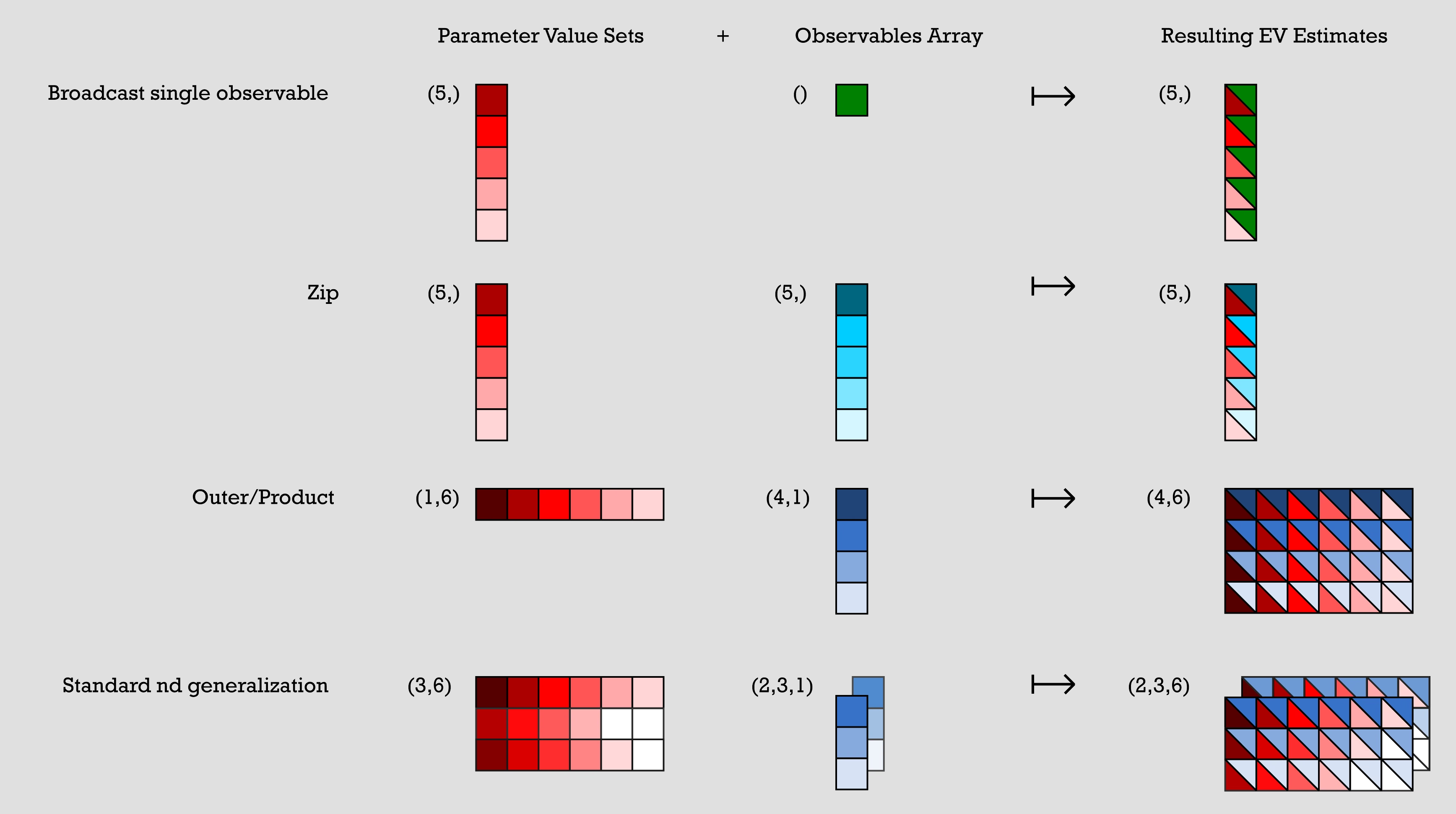
להלן מספר דוגמאות לתבניות נפוצות המבוטאות במונחים של broadcasting של מערכים. הייצוג הוויזואלי המלווה שלהן מוצג באיור שלאחר מכן:
קבוצות ערכי פרמטרים מיוצגות על ידי מערכים של n x m, ומערכי observables מיוצגים על ידי מערכי עמודה יחידה אחד או יותר. לכל דוגמה בקוד הקודם, קבוצות ערכי הפרמטרים משולבות עם מערך ה-observables שלהן כדי ליצור הערכות ערך ציפייה מתקבלות.
-
דוגמה 1: (broadcast observable יחיד) כוללת קבוצת ערכי פרמטרים שהיא מערך 5x1 ומערך observables של 1x1. הפריט היחיד במערך ה-observables משולב עם כל פריט בקבוצת ערכי הפרמטרים כדי ליצור מערך יחיד 5x1 שבו כל פריט הוא שילוב של הפריט המקורי בקבוצת ערכי הפרמטרים עם הפריט במערך ה-observables.
-
דוגמה 2: (zip) כוללת קבוצת ערכי פרמטרים של 5x1 ומערך observables של 5x1. הפלט הוא מערך 5x1 שבו כל פריט הוא שילוב של הפריט ה-n בקבוצת ערכי הפרמטרים עם הפריט ה-n במערך ה-observables.
-
דוגמה 3: (outer/product) כוללת קבוצת ערכי פרמטרים של 1x6 ומערך observables של 4x1. השילוב שלהם גורם למערך 4x6 שנוצר על ידי שילוב כל פריט בקבוצת ערכי הפרמטרים עם כל פריט במערך ה-observables, ובכך כל ערך פרמטר הופך לעמודה שלמה בפלט.
-
דוגמה 4: (הכללה סטנדרטית של nd) כוללת מערך קבוצת ערכי פרמטרים של 3x6 ושני מערכי observables של 3x1. אלה משולבים ליצירת שני מערכי פלט של 3x6 בדרך דומה לדוגמה הקודמת.
# Broadcast single observable
parameter_values = np.random.uniform(size=(5,))  # shape (5,)
observables = SparsePauliOp("ZZZ")  # shape ()
# >> pub result has shape (5,)

# Zip
parameter_values = np.random.uniform(size=(5,))  # shape (5,)
observables = [
    SparsePauliOp(pauli) for pauli in ["III", "XXX", "YYY", "ZZZ", "XYZ"]
]  # shape (5,)
# >> pub result has shape (5,)

# Outer/Product
parameter_values = np.random.uniform(size=(1, 6))  # shape (1, 6)
observables = [
    [SparsePauliOp(pauli)] for pauli in ["III", "XXX", "YYY", "ZZZ"]
]  # shape (4, 1)
# >> pub result has shape (4, 6)

# Standard nd generalization
parameter_values = np.random.uniform(size=(3, 6))  # shape (3, 6)
observables = [
    [
        [SparsePauliOp(["XII"])],
        [SparsePauliOp(["IXI"])],
        [SparsePauliOp(["IIX"])],
    ],
    [
        [SparsePauliOp(["ZII"])],
        [SparsePauliOp(["IZI"])],
        [SparsePauliOp(["IIZ"])],
    ],
]  # shape (2, 3, 1)
# >> pub result has shape (2, 3, 6)
כל SparsePauliOp נחשב כאלמנט יחיד בהקשר זה, ללא קשר למספר ה-Paulis הכלולים ב-SparsePauliOp. לכן, לצורך כללי broadcasting אלה, לכל האלמנטים הבאים יש אותה צורה:
a = SparsePauliOp("Z") # shape ()
b = SparsePauliOp("IIIIZXYIZ") # shape ()
c = SparsePauliOp.from_list(["XX", "XY", "IZ"]) # shape ()
הרשימות הבאות של אופרטורים, אף שהן שוות מבחינת המידע הכלול בהן, בעלות צורות שונות:
list1 = SparsePauliOp.from_list(["XX", "XY", "IZ"])
# list1 has shape ()
list2 = [SparsePauliOp("XX"), SparsePauliOp("XY"), SparsePauliOp("IZ")]
# list2 has shape (3, )
סקירה כללית של פלטי פרימיטיבים
ברגע ש-PUB אחד או יותר נשלחים ל-QPU לביצוע ומשימה מסתיימת בהצלחה, הנתונים מוחזרים כאובייקט מיכל PrimitiveResult. ה-PrimitiveResult מכיל רשימה איטרבילית של אובייקטי PubResult שמכילים את תוצאות הביצוע עבור כל PUB. לדוגמה, משימה שהוגשה עם 20 PUBs תחזיר אובייקט PrimitiveResult המכיל רשימה של 20 PubResults, אחד המתאים לכל PUB.
לכל אחד מאובייקטי PubResult יש גם מאפיין data וגם מאפיין metadata אופציונלי. מאפיין ה-data הוא DataBin מותאם אישית המכיל את הערכות ערך הציפייה במקרה של Estimator, או דגימות של פלט ה-Circuit במקרה של Sampler.
מאפיין ה-data עשוי להכיל גם מידע ספציפי למימוש כגון סטיות תקן. מאפיין ה-metadata יכול להכיל מידע ספציפי למימוש נוסף על ביצוע ה-PUB המשויך.
להלן מתווה חזותי של מבנה הנתונים PrimitiveResult:
- Estimator output
- Sampler output
└── PrimitiveResult
    ├── PubResult[0]
    │   ├── metadata
    │   └── data  ## In the form of a DataBin object,
    |       |     ## which includes data such as the following:
    │       ├── evs
    │       │   └── List of estimated expectation values in the shape
    |       |         specified by the first pub
    │       └── stds
    │           └── List of calculated standard deviations in the
    |                 same shape as above
    ├── PubResult[1]
    |   ├── metadata
    |   └── data  ## In the form of a DataBin object,
    |       |     ## which includes data such as the following:
    |       ├── evs
    |       │   └── List of estimated expectation values in the shape
    |       |        specified by the second pub
    |       └── stds
    |           └── List of calculated standard deviations in the
    |                same shape as above
    ├── ...
    ├── ...
    └── ...
האמור לעיל הוא דוגמה לנתונים שעשויים להיות מוחזרים. הנתונים בפועל שמוחזרים תלויים במימוש.
└── PrimitiveResult
    ├── PubResult[0]
    │   ├── metadata
    │   └── data  ## In the form of a DataBin object
    │       ├── NAME_OF_CLASSICAL_REGISTER
    │       │   └── BitArray of count data for first PUB (default is 'meas')
    |       |
    │       └── NAME_OF_ANOTHER_CLASSICAL_REGISTER
    │           └── BitArray of count data (exists only if more than one
    |                 ClassicalRegister was specified in the circuit)
    ├── PubResult[1]
    |   ├── metadata
    |   └── data  ## In the form of a DataBin object
    |       └── NAME_OF_CLASSICAL_REGISTER
    |           └── BitArray of count data for second PUB
    ├── ...
    ├── ...
    └── ...
פלט Estimator
כפי שצוין קודם לכן, הנתונים המוחזרים ב-PubResult עבור פרימיטיב ה-Estimator תלויים במימוש. לדוגמה, הם עשויים להכיל מערך של ערכי ציפייה (PubResult.data.evs) וסטיות תקן משויכות (PubResult.data.stds).
קטע הקוד הבא מתאר את פורמט ה-PrimitiveResult (ו-PubResult המשויך) עבור המשימה שנוצרה לעיל.
print(
    f"The result of the submitted job had {len(result)} PUB and "
    f"has a value:\n {result}\n"
)
print(
    f"The associated PubResult of this job has the following data bins:"
    f"\n {result[0].data}\n"
)
print(f"And this DataBin has attributes: {result[0].data.keys()}")
print(
    "Recall that this shape is due to our array of parameter binding sets "
    "having shape (100, 2) -- where 2 is the number of parameters in the circuit -- "
    "combined with our array of observables having shape (3, 1)."
)

print(
    f"The expectation values measured from this PUB are: \n{result[0].data.evs}"
)
The result of the submitted job had 1 PUB and has a value:
 PrimitiveResult([PubResult(data=DataBin(evs=np.ndarray(<shape=(3, 10), dtype=float64>), stds=np.ndarray(<shape=(3, 10), dtype=float64>), shape=(3, 10)), metadata={'target_precision': 0.0, 'circuit_metadata': {}})], metadata={'version': 2})

The associated PubResult of this job has the following data bins:
 DataBin(evs=np.ndarray(<shape=(3, 10), dtype=float64>), stds=np.ndarray(<shape=(3, 10), dtype=float64>), shape=(3, 10))

And this DataBin has attributes: dict_keys(['evs', 'stds'])
Recall that this shape is due to our array of parameter binding sets having shape (100, 2) -- where 2 is the number of parameters in the circuit -- combined with our array of observables having shape (3, 1).
The expectation values measured from this PUB are:
[[ 3.06161700e-16  4.52395120e-01  4.36594428e-01  2.16506351e-01
   6.33718361e-01 -6.33718361e-01 -2.16506351e-01 -4.36594428e-01
  -4.52395120e-01 -3.06161700e-16]
 [ 1.22464680e-16  6.42787610e-01  9.84807753e-01  8.66025404e-01
   3.42020143e-01 -3.42020143e-01 -8.66025404e-01 -9.84807753e-01
  -6.42787610e-01 -1.22464680e-16]
 [ 4.89858720e-16  2.62002630e-01 -1.11618897e-01 -4.33012702e-01
   9.25416578e-01 -9.25416578e-01  4.33012702e-01  1.11618897e-01
  -2.62002630e-01 -4.89858720e-16]]
פלט Sampler
כאשר משימת Sampler מסתיימת בהצלחה, אובייקט ה-PrimitiveResult המוחזר מכיל רשימה של SamplerPubResultים, אחד לכל PUB. מאגרי הנתונים של אובייקטי SamplerPubResult אלה הם אובייקטים דמויי-dict המכילים BitArray אחד לכל ClassicalRegister ב-Circuit.
מחלקת ה-BitArray היא מיכל לנתוני shot מסודרים. בפירוט רב יותר, היא שומרת את מחרוזות הביטים שנדגמו כ-bytes בתוך מערך דו-ממדי. הציר השמאלי ביותר של מערך זה עובר על shots מסודרים, בעוד שהציר הימני ביותר עובר על bytes.
כדוגמה ראשונה, בואו נסתכל על ה-Circuit הבא בעל עשרה Qubits:
from qiskit.primitives import StatevectorSampler

# generate a ten-qubit GHZ circuit
circuit = QuantumCircuit(10)
circuit.h(0)
circuit.cx(range(0, 9), range(1, 10))

# append measurements with the `measure_all` method
circuit.measure_all()

# transpile the circuit
transpiled_circuit = pm.run(circuit)

sampler = StatevectorSampler()

# run the Sampler job and retrieve the results

job = sampler.run([transpiled_circuit])
result = job.result()

# the data bin contains one BitArray
data = result[0].data
print(f"Databin: {data}\n")

# to access the BitArray, use the key "meas", which is the default name of
# the classical register when this is added by the `measure_all` method
array = data.meas
print(f"BitArray: {array}\n")
print(f"The shape of register `meas` is {data.meas.array.shape}.\n")
print(f"The bytes in register `alpha`, shot by shot:\n{data.meas.array}\n")
Databin: DataBin(meas=BitArray(<shape=(), num_shots=1024, num_bits=10>))

BitArray: BitArray(<shape=(), num_shots=1024, num_bits=10>)

The shape of register `meas` is (1024, 2).

The bytes in register `alpha`, shot by shot:
[[  3 255]
 [  0   0]
 [  3 255]
 ...
 [  0   0]
 [  3 255]
 [  0   0]]
לעתים נוח להמיר מפורמט ה-bytes ב-BitArray למחרוזות ביטים. שיטת get_count מחזירה מילון שממפה מחרוזות ביטים למספר הפעמים שהן התרחשו.
# optionally convert the native BitArray format to a dictionary format
counts = data.meas.get_counts()
print(f"Counts: {counts}")
Counts: {'1111111111': 484, '0000000000': 540}
כאשר Circuit מכיל יותר מ-ClassicalRegister אחד, התוצאות מאוחסנות באובייקטי BitArray שונים. הדוגמה הבאה משנה את הקטע הקודם על ידי פיצול ה-ClassicalRegister לשני registers נפרדים:
# generate a ten-qubit GHZ circuit with two classical registers
circuit = QuantumCircuit(
    qreg := QuantumRegister(10),
    alpha := ClassicalRegister(1, "alpha"),
    beta := ClassicalRegister(9, "beta"),
)
circuit.h(0)
circuit.cx(range(0, 9), range(1, 10))

# append measurements with the `measure_all` method
circuit.measure([0], alpha)
circuit.measure(range(1, 10), beta)

# transpile the circuit
transpiled_circuit = pm.run(circuit)

# run the Sampler job and retrieve the results

job = sampler.run([transpiled_circuit])
result = job.result()

# the data bin contains two BitArrays, one per register, and can be accessed
# as attributes using the registers' names
data = result[0].data
print(f"BitArray for register 'alpha': {data.alpha}")
print(f"BitArray for register 'beta': {data.beta}")
BitArray for register 'alpha': BitArray(<shape=(), num_shots=1024, num_bits=1>)
BitArray for register 'beta': BitArray(<shape=(), num_shots=1024, num_bits=9>)
ניצול אובייקטי BitArray לעיבוד מאוחר יעיל
מכיוון שמערכים בדרך כלל מציעים ביצועים טובים יותר בהשוואה למילונים, מומלץ לבצע כל עיבוד מאוחר ישירות על אובייקטי BitArray ולא על מילוני ספירות. מחלקת BitArray מציעה מגוון שיטות לביצוע כמה פעולות עיבוד מאוחר נפוצות:
print(f"The shape of register `alpha` is {data.alpha.array.shape}.")
print(f"The bytes in register `alpha`, shot by shot:\n{data.alpha.array}\n")

print(f"The shape of register `beta` is {data.beta.array.shape}.")
print(f"The bytes in register `beta`, shot by shot:\n{data.beta.array}\n")

# post-select the bitstrings of `beta` based on having sampled "1" in `alpha`
mask = data.alpha.array == "0b1"
ps_beta = data.beta[mask[:, 0]]
print(f"The shape of `beta` after post-selection is {ps_beta.array.shape}.")
print(f"The bytes in `beta` after post-selection:\n{ps_beta.array}")

# get a slice of `beta` to retrieve the first three bits
beta_sl_bits = data.beta.slice_bits([0, 1, 2])
print(
    f"The shape of `beta` after bit-wise slicing is {beta_sl_bits.array.shape}."
)
print(f"The bytes in `beta` after bit-wise slicing:\n{beta_sl_bits.array}\n")

# get a slice of `beta` to retrieve the bytes of the first five shots
beta_sl_shots = data.beta.slice_shots([0, 1, 2, 3, 4])
print(
    f"The shape of `beta` after shot-wise slicing is {beta_sl_shots.array.shape}."
)
print(
    f"The bytes in `beta` after shot-wise slicing:\n{beta_sl_shots.array}\n"
)

# calculate the expectation value of diagonal operators on `beta`
ops = [SparsePauliOp("ZZZZZZZZZ"), SparsePauliOp("IIIIIIIIZ")]
exp_vals = data.beta.expectation_values(ops)
for o, e in zip(ops, exp_vals):
    print(f"Exp. val. for observable `{o}` is: {e}")

# concatenate the bitstrings in `alpha` and `beta` to "merge" the results
# of the two registers
merged_results = BitArray.concatenate_bits([data.alpha, data.beta])
print(f"\nThe shape of the merged results is {merged_results.array.shape}.")
print(f"The bytes of the merged results:\n{merged_results.array}\n")
The shape of register `alpha` is (1024, 1).
The bytes in register `alpha`, shot by shot:
[[1]
 [1]
 [0]
 ...
 [1]
 [0]
 [1]]

The shape of register `beta` is (1024, 2).
The bytes in register `beta`, shot by shot:
[[  1 255]
 [  1 255]
 [  0   0]
 ...
 [  1 255]
 [  0   0]
 [  1 255]]

The shape of `beta` after post-selection is (0, 2).
The bytes in `beta` after post-selection:
[]
The shape of `beta` after bit-wise slicing is (1024, 1).
The bytes in `beta` after bit-wise slicing:
[[7]
 [7]
 [0]
 ...
 [7]
 [0]
 [7]]

The shape of `beta` after shot-wise slicing is (5, 2).
The bytes in `beta` after shot-wise slicing:
[[  1 255]
 [  1 255]
 [  0   0]
 [  0   0]
 [  1 255]]

Exp. val. for observable `SparsePauliOp(['ZZZZZZZZZ'],
              coeffs=[1.+0.j])` is: -0.02734375
Exp. val. for observable `SparsePauliOp(['IIIIIIIIZ'],
              coeffs=[1.+0.j])` is: -0.02734375

The shape of the merged results is (1024, 2).
The bytes of the merged results:
[[  3 255]
 [  3 255]
 [  0   0]
 ...
 [  3 255]
 [  0   0]
 [  3 255]]
מטאדאטה של תוצאות
בנוסף לתוצאות הביצוע, אובייקטי PrimitiveResult ו-PubResult מכילים מאפיין מטאדאטה אופציונלי על המשימה שהוגשה. המטאדאטה המוחזרת (אם בכלל) ספציפית למימוש.
# Print out the results metadata
print("The metadata of the PrimitiveResult is:")
for key, val in result.metadata.items():
    print(f"'{key}' : {val},")

print("\nThe metadata of the PubResult result is:")
for key, val in result[0].metadata.items():
    print(f"'{key}' : {val},")
The metadata of the PrimitiveResult is:
'version' : 2,

The metadata of the PubResult result is:
'shots' : 1024,
'circuit_metadata' : {},
השלבים הבאים
-
עיין ב-API של פרימיטיבי Qiskit SDK.
-
עיין ב-API של פרימיטיבי Qiskit Aer.
-
למד עוד על פרימיטיבי IBM Quantum.
-
עיין ב-API של
qiskit-ibm-runtimeEstimator. -
עיין ב-API של
qiskit-ibm-runtimeSampler.