Singularity Machine Learning - Classification: פונקציית Qiskit מאת Multiverse Computing
ראה את ה-API reference
Package versions
הקוד בעמוד הזה פותח באמצעות הדרישות הבאות. אנחנו ממליצים להשתמש בגרסאות האלה או חדשות יותר.
scikit-learn~=1.8.0
- Qiskit Functions הן פיצ'ר ניסיוני הזמין רק למשתמשי IBM Quantum® Premium Plan, Flex Plan, ו-On-Prem (דרך IBM Quantum Platform API) Plan. הן בסטטוס גרסת תצוגה מקדימה וכפופות לשינויים.
סקירה כללית
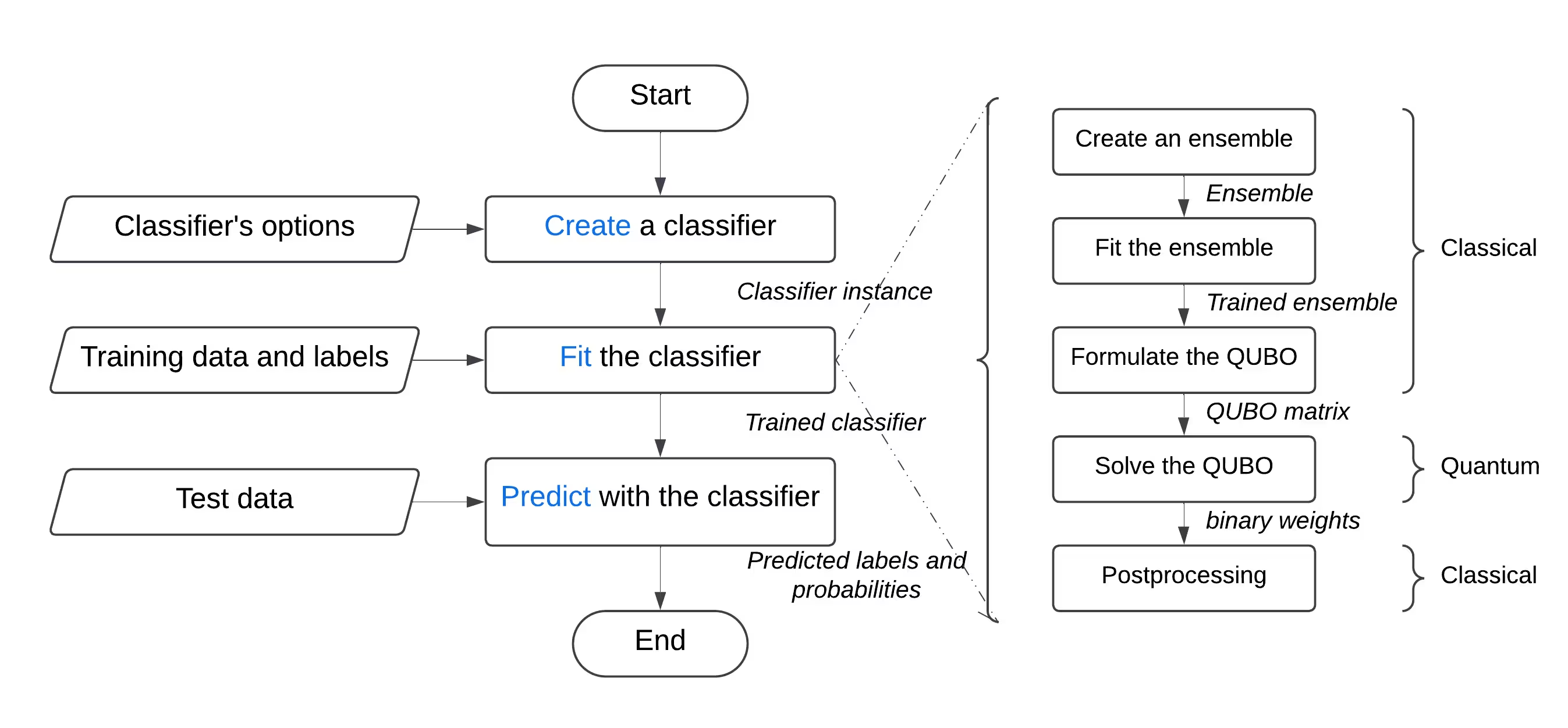
עם פונקציית "Singularity Machine Learning - Classification", אתה יכול לפתור בעיות למידת מכונה מהעולם האמיתי על חומרה קוונטית מבלי שתידרש מומחיות קוונטית. פונקציית Application זו, המבוססת על שיטות אנסמבל, היא מסווג היברידי. היא מנצלת שיטות קלאסיות כמו boosting, bagging ו-stacking לאימון אנסמבל ראשוני. לאחר מכן, אלגוריתמים קוונטיים כגון variational quantum eigensolver (VQE) ו-quantum approximate optimization algorithm (QAOA) מוחלים כדי לשפר את הגיוון, יכולות ההכללה, והמורכבות הכוללת של האנסמבל המאומן.
שלא כמו פתרונות קוונטיים אחרים ללמידת מכונה, פונקציה זו מסוגלת לטפל בסטי נתונים בקנה מידה גדול עם מיליוני דוגמאות ותכונות, מבלי שתהיה מוגבלת על ידי מספר ה-Qubits ב-QPU המטרה. מספר ה-Qubits קובע רק את גודל האנסמבל שניתן לאמן. בנוסף, הפונקציה גמישה מאוד, וניתן להשתמש בה לפתרון בעיות סיווג במגוון רחב של תחומים, כולל פיננסים, בריאות וסייבר.
היא משיגה באופן עקבי דיוקים גבוהים בבעיות מאתגרות קלאסית הכוללות סטי נתונים בממד גבוה, רועשים וחסרי איזון.
 היא נבנתה עבור:
- מהנדסים ומדעני נתונים בחברות המבקשים לשפר את ההצעות הטכנולוגיות שלהם על ידי שילוב למידת מכונה קוונטית במוצרים ובשירותים שלהם,
- חוקרים במעבדות מחקר קוונטי החוקרים יישומי למידת מכונה קוונטית ומבקשים לנצל את המחשוב הקוונטי למשימות סיווג, ו-
- סטודנטים ומורים במוסדות חינוך בקורסים כמו למידת מכונה, המבקשים להדגים את יתרונות המחשוב הקוונטי.
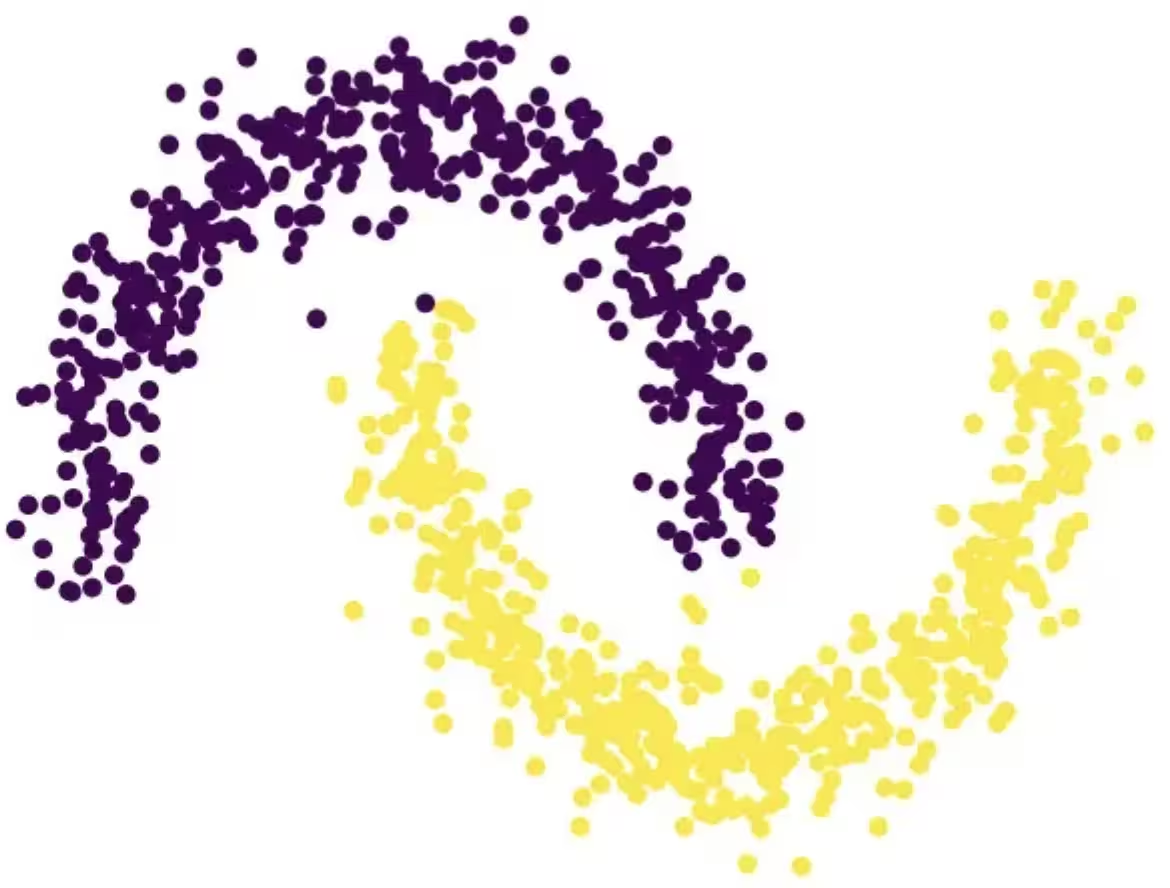
הדוגמה הבאה מציגה את הפונקציונליות השונות שלה, כולל create, list, fit ו-predict, ומדגימה את השימוש בה בבעיה סינתטית המורכבת משני חצאי עיגולים משתלבים — בעיה ידועה לשמצה בגלל הגבול ההחלטה הלא-לינארי שלה.
תיאור הפונקציה
פונקציית Qiskit זו מאפשרת למשתמשים לפתור בעיות סיווג בינארי באמצעות מסווג האנסמבל המשופר קוונטית של Singularity. מאחורי הקלעים, היא משתמשת בגישה היברידית לאימון קלאסי של אנסמבל מסווגים על סט הנתונים המתויג, ולאחר מכן לאופטימיזציה שלו לגיוון מרבי והכללה באמצעות Quantum Approximate Optimization Algorithm (QAOA) על IBM® QPUs. דרך ממשק ידידותי למשתמש, ניתן להגדיר מסווג בהתאם לדרישות שלך, לאמן אותו על סט הנתונים שתבחר, ולהשתמש בו לביצוע תחזיות על סט נתונים שלא נראה בעבר.
לפתרון בעיית סיווג גנרית:
- עבד מראש את סט הנתונים, וחלק אותו לסטי אימון ובדיקה. באופן אופציונלי, ניתן לחלק עוד יותר את סט האימון לסטי אימון ואימות. ניתן להשיג זאת באמצעות scikit-learn.
- אם סט האימון אינו מאוזן, ניתן לדגום אותו מחדש כדי לאזן את המחלקות באמצעות imbalanced-learn.
- העלה את סטי האימון, האימות והבדיקה בנפרד לאחסון הפונקציה באמצעות שיטת
file_uploadשל הקטלוג, תוך העברת הנתיב הרלוונטי בכל פעם. - אתחל את המסווג הקוונטי באמצעות פעולת
createשל הפונקציה, המקבלת hyperparameters כגון מספר סוגי הלומדים, הרגולריזציה (ערך lambda), ואפשרויות אופטימיזציה כולל מספר שכבות, סוג האופטימייזר הקלאסי, ה-Backend הקוונטי, וכן הלאה. - אמן את המסווג הקוונטי על סט האימון באמצעות פעולת
fitשל הפונקציה, תוך העברת סט האימון המתויג, וסט האימות אם רלוונטי. - בצע תחזיות על סט הבדיקה שלא נראה בעבר באמצעות פעולת
predictשל הפונקציה.
התחלה
אמת את זהותך באמצעות מפתח ה-API של IBM Quantum Platform, ובחר את פונקציית Qiskit כך:
# Added by doQumentation — installs the packages this notebook needs if they are missing
import importlib.util

_needed = {"numpy": "numpy", "qiskit_ibm_catalog": "qiskit-ibm-catalog", "sklearn": "scikit-learn"}
_missing = [pip for module, pip in _needed.items()
            if importlib.util.find_spec(module) is None]
# One at a time, so a package that fails to install does not block the others
for _pip in _missing:
    %pip install -q {_pip}
if not _missing:
    print("\u2713 All required packages are installed")
from qiskit_ibm_catalog import QiskitFunctionsCatalog

catalog = QiskitFunctionsCatalog(channel="ibm_quantum_platform")

# Verify that you have access to the function
catalog.list()
[QiskitFunction(qunova/hivqe-chemistry),
 QiskitFunction(global-data-quantum/quantum-portfolio-optimizer),
 QiskitFunction(algorithmiq/tem),
 QiskitFunction(qedma/qesem),
 QiskitFunction(multiverse/singularity),
 QiskitFunction(ibm/circuit-function),
 QiskitFunction(q-ctrl/optimization-solver),
 QiskitFunction(colibritd/quick-pde),
 QiskitFunction(q-ctrl/performance-management),
 QiskitFunction(kipu-quantum/iskay-quantum-optimizer)]
# load function
singularity = catalog.load("multiverse/singularity")
דוגמאות
סיווג סט נתונים
בדוגמה זו, תשתמש בפונקציית "Singularity Machine Learning - Classification" כדי לסווג סט נתונים המורכב משני חצאי עיגולים בצורת ירח המשתלבים. סט הנתונים הוא סינתטי, דו-ממדי, ומתויג בתוויות בינאריות. הוא נוצר כך שיהיה מאתגר לאלגוריתמים כמו קיבוץ מבוסס-צנטרואיד וסיווג לינארי.
 במהלך תהליך זה, תלמד כיצד ליצור את המסווג, לאמן אותו על נתוני האימון, להשתמש בו לביצוע תחזיות על נתוני הבדיקה, ולמחוק את המסווג כשתסיים.
לפני שתתחיל, עליך להתקין את scikit-learn. התקן אותו באמצעות הפקודה הבאה:
במהלך תהליך זה, תלמד כיצד ליצור את המסווג, לאמן אותו על נתוני האימון, להשתמש בו לביצוע תחזיות על נתוני הבדיקה, ולמחוק את המסווג כשתסיים.
לפני שתתחיל, עליך להתקין את scikit-learn. התקן אותו באמצעות הפקודה הבאה:
python3 -m pip install scikit-learn
בצע את השלבים הבאים:
-
צור את סט הנתונים הסינתטי באמצעות פונקציית
make_moonsמ-scikit-learn. -
העלה את סט הנתונים הסינתטי שנוצר לספריית הנתונים המשותפת.
-
צור את המסווג המשופר קוונטית באמצעות פעולת
create. -
רשום את המסווגים שלך באמצעות פעולת
list. -
אמן את המסווג על נתוני האימון באמצעות פעולת
fit. -
השתמש במסווג המאומן לביצוע תחזיות על נתוני הבדיקה באמצעות פעולת
predict. -
מחק את המסווג באמצעות פעולת
delete. -
נקה לאחר שסיימת. שלב 1. ייבא את המודולים הדרושים וצור את סט הנתונים הסינתטי, לאחר מכן חלק אותו לסטי אימון ובדיקה.
# import the necessary modules for this example
import os
import tarfile
import numpy as np

# Import the make_moons and the train_test_split functions from scikit-learn
# to create a synthetic dataset and split it into training and test datasets
from sklearn.datasets import make_moons
from sklearn.model_selection import train_test_split

# generate the synthetic dataset
X, y = make_moons(n_samples=10000)

# split the data into training and test datasets
X_train, X_test, y_train, y_test = train_test_split(X, y, test_size=0.2)

# print the first 10 samples of the training dataset
print("Features:", X_train[:10, :])
print("Targets:", y_train[:10])
Features: [[ 0.84757037 -0.48831433]
 [ 0.98132552  0.19235443]
 [-0.71626723  0.6978261 ]
 [ 1.18957848 -0.48186557]
 [ 0.52118982 -0.37791846]
 [ 0.81115408  0.58483251]
 [ 0.48706462  0.87336593]
 [-0.81880144  0.57407682]
 [ 1.67335408 -0.23932015]
 [ 0.50181306  0.8649761 ]]
Targets: [1 0 0 1 1 0 0 0 1 0]
שלב 2. שמור את סטי הנתונים המתויגים לאימון ובדיקה על הדיסק המקומי שלך, ולאחר מכן העלה אותם לספריית הנתונים המשותפת.
def make_tarfile(file_path, tar_file_name):
    with tarfile.open(tar_file_name, "w") as tar:
        tar.add(file_path, arcname=os.path.basename(file_path))

# save the training and test datasets on your local disk
np.save("X_train.npy", X_train)
np.save("y_train.npy", y_train)
np.save("X_test.npy", X_test)
np.save("y_test.npy", y_test)

# create tar files for the datasets
make_tarfile("X_train.npy", "X_train.npy.tar")
make_tarfile("y_train.npy", "y_train.npy.tar")
make_tarfile("X_test.npy", "X_test.npy.tar")
make_tarfile("y_test.npy", "y_test.npy.tar")

# upload the datasets to the shared data directory
catalog.file_upload("X_train.npy.tar", singularity)
catalog.file_upload("y_train.npy.tar", singularity)
catalog.file_upload("X_test.npy.tar", singularity)
catalog.file_upload("y_test.npy.tar", singularity)

# view/enlist the uploaded files in the shared data directory
print(catalog.files(singularity))
['X_test.npy.tar', 'X_train.npy.tar', 'y_test.npy.tar', 'y_train.npy.tar']
שלב 3. צור מסווג משופר קוונטית באמצעות פעולת create.
job = singularity.run(
    action="create",
    name="my_classifier",
    num_learners=10,
    learners_types=[
        "DecisionTreeClassifier",
        "KNeighborsClassifier",
    ],
    learners_proportions=[0.5, 0.5],
    learners_options=[{}, {}],
    regularization=0.01,
    weight_update_method="logarithmic",
    sample_scaling=True,
    optimizer_options={"simulator": True},
    voting="soft",
    prob_threshold=0.5,
)

print(job.result())
{'status': 'ok', 'message': 'Classifier created.', 'data': {}, 'metadata': {'resource_usage': {}}}
# list available classifiers using the list action
job = singularity.run(action="list")

print(job.result())

# you can also find your classifiers in the shared data directory with a *.pkl.tar extension
print(catalog.files(singularity))
{'status': 'ok', 'message': 'Classifiers listed.', 'data': {'classifiers': ['my_classifier']}, 'metadata': {'resource_usage': {}}}
['X_test.npy.tar', 'X_train.npy.tar', 'my_classifier.pkl.tar', 'y_test.npy.tar', 'y_train.npy.tar']
שלב 4. אמן את המסווג המשופר קוונטית באמצעות פעולת fit.
job = singularity.run(
    action="fit",
    name="my_classifier",
    X="X_train.npy",  # you do not need to specify the tar extension
    y="y_train.npy",  # you do not need to specify the tar extension
)

print(job.result())
{'status': 'ok', 'message': 'Classifier fitted.', 'data': {}, 'metadata': {'resource_usage': {'RUNNING: MAPPING': {'CPU_TIME': 13.655871629714966}, 'RUNNING: WAITING_QPU': {'CPU_TIME': 54.688621282577515}, 'RUNNING: POST_PROCESSING': {'CPU_TIME': 56.92286920547485}, 'RUNNING: EXECUTING_QPU': {'QPU_TIME': 57.92738223075867}}}}
שלב 5. קבל תחזיות והסתברויות מהמסווג המשופר קוונטית באמצעות פעולת predict.
job = singularity.run(
    action="predict",
    name="my_classifier",
    X="X_test.npy",  # you do not need to specify the tar extension
)

result = job.result()

print("Action result status: ", result["status"])
print("Action result message: ", result["message"])
print("Predictions (first five results):", result["data"]["predictions"][:5])
print(
    "Probabilities (first five results):", result["data"]["probabilities"][:5]
)
Action result status:  ok
Action result message:  Classifier predicted.
Predictions (first five results): [0, 0, 1, 0, 1]
Probabilities (first five results): [[1.0, 0.0], [1.0, 0.0], [0.0, 1.0], [1.0, 0.0], [0.0, 1.0]]
שלב 6. מחק את המסווג המשופר קוונטית באמצעות פעולת delete.
job = singularity.run(
    action="delete",
    name="my_classifier",
)

# or you can delete from the shared data directory
# catalog.file_delete("my_classifier.pkl.tar", singularity)

print(job.result())
{'status': 'ok', 'message': 'Classifier deleted.', 'data': {}, 'metadata': {'resource_usage': {}}}
שלב 7. נקה ספריות נתונים מקומיות ומשותפות.
# delete the numpy files from your local disk
os.remove("X_train.npy")
os.remove("y_train.npy")
os.remove("X_test.npy")
os.remove("y_test.npy")

# delete the tar files from your local disk
os.remove("X_train.npy.tar")
os.remove("y_train.npy.tar")
os.remove("X_test.npy.tar")
os.remove("y_test.npy.tar")

# delete the tar files from the shared data
catalog.file_delete("X_train.npy.tar", singularity)
catalog.file_delete("y_train.npy.tar", singularity)
catalog.file_delete("X_test.npy.tar", singularity)
catalog.file_delete("y_test.npy.tar", singularity)
'Requested file was deleted.'
דוגמת create_fit_predict
הדוגמה הבאה מדגימה את פעולת create_fit_predict.
# Import QiskitFunctionsCatalog to load the
# "Singularity Machine Learning - Classification" function by Multiverse Computing
from qiskit_ibm_catalog import QiskitFunctionsCatalog

# Import the make_moons and the train_test_split functions from scikit-learn
# to create a synthetic dataset and split it into training and test datasets
from sklearn.datasets import make_moons
from sklearn.model_selection import train_test_split

# authentication
# If you have not previously saved your credentials, follow instructions at
# /docs/guides/functions
# to authenticate with your API key.
catalog = QiskitFunctionsCatalog(channel="ibm_quantum_platform")

# load "Singularity Machine Learning - Classification" function by Multiverse Computing
singularity = catalog.load("multiverse/singularity")

# generate the synthetic dataset
X, y = make_moons(n_samples=1000)

# split the data into training and test datasets
X_train, X_test, y_train, y_test = train_test_split(X, y, test_size=0.2)

job = singularity.run(
    action="create_fit_predict",
    num_learners=10,
    regularization=0.01,
    optimizer_options={"simulator": True},
    X_train=X_train,
    y_train=y_train,
    X_test=X_test,
    options={"save": False},
)

# get job status and result
status = job.status()
result = job.result()

print("Job status: ", status)
print("Action result status: ", result["status"])
print("Action result message: ", result["message"])
print("Predictions (first five results): ", result["data"]["predictions"][:5])
print(
    "Probabilities (first five results): ",
    result["data"]["probabilities"][:5],
)
print("Usage metadata: ", result["metadata"]["resource_usage"])
Job status:  QUEUED
Action result status:  ok
Action result message:  Classifier created, fitted, and predicted.
Predictions (first five results):  [0, 0, 1, 0, 0]
Probabilities (first five results):  [[0.87119766531518, 0.1288023346848197], [0.87119766531518, 0.1288023346848197], [0.24470328446479797, 0.7552967155352032], [0.820524432250189, 0.17947556774981072], [0.6847610293419495, 0.31523897065805173]]
Usage metadata:  {'RUNNING: MAPPING': {'CPU_TIME': 10.967791318893433}, 'RUNNING: WAITING_QPU': {'CPU_TIME': 59.91712307929993}, 'RUNNING: POST_PROCESSING': {'CPU_TIME': 59.097386837005615}, 'RUNNING: EXECUTING_QPU': {'QPU_TIME': 56.93338203430176}}
מדדי ביצועים
מדדי ביצועים אלו מראים שהמסווג יכול להשיג דיוקים גבוהים ביותר בבעיות מאתגרות. הם גם מראים שהגדלת מספר הלומדים באנסמבל (מספר Qubits) יכולה להוביל לדיוק מוגבר.
"דיוק קלאסי" מתייחס לדיוק המושג באמצעות ה-state of the art הקלאסי המקביל, שבמקרה זה הוא מסווג AdaBoost המבוסס על אנסמבל בגודל 75. "דיוק קוונטי", לעומת זאת, מתייחס לדיוק המושג באמצעות "Singularity Machine Learning - Classification".
| בעיה | גודל סט נתונים | גודל אנסמבל | מספר Qubits | דיוק קלאסי | דיוק קוונטי | שיפור |
|---|---|---|---|---|---|---|
| יציבות רשת | 5000 דוגמאות, 12 תכונות | 55 | 55 | 76% | 91% | 15% |
| יציבות רשת | 5000 דוגמאות, 12 תכונות | 65 | 65 | 76% | 92% | 16% |
| יציבות רשת | 5000 דוגמאות, 12 תכונות | 75 | 75 | 76% | 94% | 18% |
| יציבות רשת | 5000 דוגמאות, 12 תכונות | 85 | 85 | 76% | 94% | 18% |
| יציבות רשת | 5000 דוגמאות, 12 תכונות | 100 | 100 | 76% | 95% | 19% |
ככל שחומרה קוונטית מתפתחת ומתרחבת, ההשלכות על המסווג הקוונטי שלנו הולכות וגדלות. בעוד שמספר ה-Qubits אכן מגביל את גודל האנסמבל שניתן לנצל, הוא אינו מגביל את נפח הנתונים שניתן לעבד. יכולת עוצמתית זו מאפשרת למסווג לטפל ביעילות בסטי נתונים המכילים מיליוני נקודות נתונים ואלפי תכונות. חשוב לציין שניתן להתמודד עם מגבלות הקשורות לגודל האנסמבל באמצעות יישום גרסה בקנה מידה גדול של המסווג. על ידי מינוף גישת לולאה חיצונית איטרטיבית, ניתן להרחיב את האנסמבל באופן דינמי, משפר את הגמישות והביצועים הכוללים. עם זאת, ראוי לציין שתכונה זו טרם יושמה בגרסה הנוכחית של המסווג.
יומן שינויים
4 ביוני 2025
-
שדרוג
QuantumEnhancedEnsembleClassifierעם העדכונים הבאים:-
נוספה רגולריזציה onsite/alpha. ניתן לציין
regularization_typeכ-onsiteאוalpha -
נוספה רגולריזציה אוטומטית. ניתן להגדיר
regularizationל-autoלשימוש ברגולריזציה אוטומטית -
נוסף פרמטר
optimization_dataלשיטתfitלבחירת נתוני אופטימיזציה לאופטימיזציה קוונטית. ניתן להשתמש באחת מהאפשרויות:train,validation, אוboth -
שיפור ביצועים כולל
-
-
נוסף מעקב מצב מפורט לעבודות רצות
20 במאי 2025
- תקנון טיפול בשגיאות
18 במרץ 2025
- שדרוג qiskit-serverless ל-0.20.0 ו-base image ל-0.20.1
14 בפברואר 2025
- שדרוג base image ל-0.19.1
6 בפברואר 2025
- שדרוג qiskit-serverless ל-0.19.0 ו-base image ל-0.19.0
13 בנובמבר 2024
- שחרור Singularity Machine Learning - Classification
קבלת תמיכה
לכל שאלה, פנה אל Multiverse Computing.
הקפד לכלול את המידע הבא:
-
מזהה ה-Job של פונקציית Qiskit (
job.job_id) -
תיאור מפורט של הבעיה
-
כל הודעות שגיאה או קודים רלוונטיים
-
שלבים לשחזור הבעיה