פונקציית Circuit של IBM
See the API reference
- פונקציות Qiskit הן תכונה ניסיונית הזמינה רק למשתמשי IBM Quantum® Premium Plan, Flex Plan ו-On-Prem (דרך IBM Quantum Platform API) Plan. הן נמצאות בסטטוס שחרור תצוגה מקדימה וכפופות לשינויים.
סקירה כללית
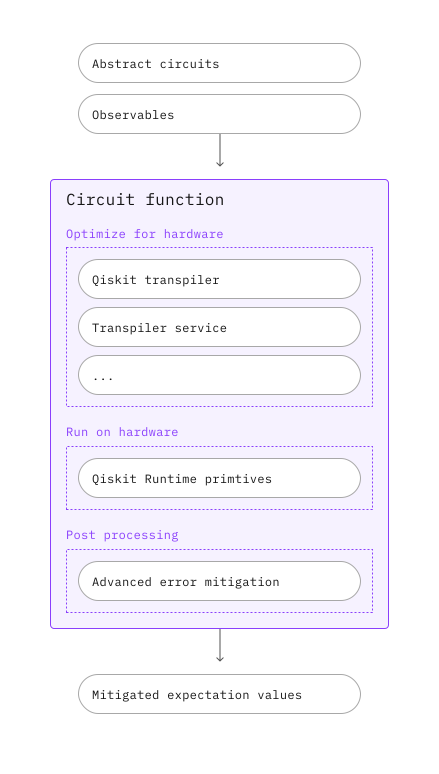
פונקציית Circuit של IBM® מקבלת PUBs מופשטים כקלט ומחזירה ערכי ציפייה מותאמים כפלט. פונקציית Circuit זו כוללת צינור עיבוד אוטומטי ומותאם אישית כדי לאפשר לחוקרים להתמקד בגילוי אלגוריתמים ויישומים.
תיאור
לאחר שתגיש את ה-PUB שלך, המעגלים המופשטים והאובזרבלים שלך יעברו טרנספילציה אוטומטית, הרצה על חומרה ועיבוד-לאחר כדי להחזיר ערכי ציפייה מותאמים. לשם כך, הפונקציה משלבת את הכלים הבאים:
- שירות Qiskit Transpiler, כולל בחירה אוטומטית של מעברי טרנספילציה מונחי בינה מלאכותית והיוריסטיים לתרגום המעגלים המופשטים שלך למעגלי ISA מותאמי חומרה
- טכניקות דיכוי ומיתון שגיאות הנדרשות לחישוב בקנה מידה שימושי, כולל twirling של מדידות ושערים, ניתוק דינמי, Twirled Readout Error eXtinction (TREX), Zero-Noise Extrapolation (ZNE) ו-Probabilistic Error Amplification (PEA)
- Qiskit Runtime Estimator, להרצת PUBs מסוג ISA על חומרה והחזרת ערכי ציפייה מותאמים
תחילת עבודה
אמת את זהותך באמצעות מפתח ה-API שלך ובחר את פונקציית Qiskit כדלקמן. (קטע קוד זה מניח שכבר שמרת את חשבונך בסביבה המקומית שלך.)
# Added by doQumentation — required packages for this notebook
!pip install -q qiskit qiskit-ibm-catalog qiskit-ibm-runtime
from qiskit_ibm_catalog import QiskitFunctionsCatalog

catalog = QiskitFunctionsCatalog(channel="ibm_quantum_platform")

function = catalog.load("ibm/circuit-function")
דוגמאות
כדי להתחיל, נסה את הדוגמה הבסיסית הזו:
from qiskit.circuit.random import random_circuit
from qiskit_ibm_runtime import QiskitRuntimeService

# You can skip this step if you have a target backend, e.g.
# backend_name = "ibm_brisbane"
# You'll need to specify the credentials when initializing QiskitRuntimeService, if they were not previously saved.
service = QiskitRuntimeService()
backend = service.least_busy(operational=True, simulator=False)

circuit = random_circuit(num_qubits=2, depth=2, seed=42)
observable = "Z" * circuit.num_qubits
pubs = [(circuit, observable)]

job = function.run(
    # Use `backend_name=backend_name` if you didn't initialize a backend object
    backend_name=backend.name,
    pubs=pubs,
)
בדוק את הסטטוס של עומס העבודה של פונקציית Qiskit שלך או אחזר את התוצאות כדלקמן:
print(job.status())
result = job.result()
QUEUED
לתוצאות יש את אותו פורמט כמו תוצאת Estimator:
print(f"The result of the submitted job had {len(result)} PUB\n")
print(
    f"The associated PubResult of this job has the following DataBins:\n {result[0].data}\n"
)
print(f"And this DataBin has attributes: {result[0].data.keys()}")
print(
    f"The expectation values measured from this PUB are: \n{result[0].data.evs}"
)
The result of the submitted job had 1 PUB

The associated PubResult of this job has the following DataBins:
 DataBin(evs=np.ndarray(<shape=(), dtype=float64>), stds=np.ndarray(<shape=(), dtype=float64>), ensemble_standard_error=np.ndarray(<shape=(), dtype=float64>))

And this DataBin has attributes: dict_keys(['evs', 'stds', 'ensemble_standard_error'])
The expectation values measured from this PUB are:
1.02116704805492
דוגמאות לרמת מיתון
הדוגמה הבאה מדגימה הגדרת רמת המיתון:
options = {"mitigation_level": 2}

job = function.run(backend_name=backend.name, pubs=pubs, options=options)
בדוגמה הבאה, הגדרת רמת המיתון ל-1 מכבה בתחילה את מיתון ZNE, אך הגדרת zne_mitigation ל-True עוקפת את ההגדרה הרלוונטית מ-mitigation_level.
options = {"mitigation_level": 1, "resilience": {"zne_mitigation": True}}
דוגמת פלט
קטע הקוד הבא מתאר את פורמט ה-PrimitiveResult (וה-PubResult המשויך).
print(f"The result of the submitted job had {len(result)} PUB")
print(
    f"The expectation values measured from this PUB are: \n{result[0].data.evs}"
)
print(f"And the associated metadata is: \n{result[0].metadata}")
The result of the submitted job had 1 PUB
The expectation values measured from this PUB are:
1.02116704805492
And the associated metadata is:
{'shots': 4096, 'target_precision': 0.015625, 'circuit_metadata': {}, 'resilience': {}, 'num_randomizations': 32}
אחזור הודעות שגיאה
אם סטטוס עומס העבודה שלך הוא ERROR, השתמש ב-job.result() כדי לאחזר את הודעת השגיאה לצורך ניפוי באגים:
job = function.run(
    backend_name="bad_backend_name", pubs=pubs, options=options
)

print(job.result())
קבלת תמיכה
פנה ל-תמיכה של IBM Quantum וכלול את המידע הבא:
- מזהה משימת פונקציית Qiskit (
qiskit-ibm-catalog),job.job_id - תיאור מפורט של הבעיה
- כל הודעות שגיאה או קודים רלוונטיים
- שלבים לשחזור הבעיה
השלבים הבאים
- נסה את המדריך מיתון שגיאות עם פונקציית Circuit של IBM.
- בקר ב-תיעוד ה-API של פונקציית Qiskit זו.